As a security practitioner, you are required to stay on top of the latest threat intelligence and vulnerability news, including those that impact IoT cameras. To do so, you must rely on the community of developers, hackers, hobbyists, and other security practitioners to stay up to date.
A common method is learning about the latest Common Vulnerabilities and Exposures (CVEs), which assign unique codes to reported vulnerabilities. The code uses the format CVE-YYYY-NNNN.., where YYYY represents the year in which the vulnerability was assigned a unique CVE number, and NNNN.. is a random ID for that vulnerability. CVE lookups are a great way to keep yourself informed about the latest vulnerabilities affecting your cameras.
Along with CVE lookups, blogs, news aggregators, and RSS feeds also sometimes provide valuable and pointed insights into your camera's vulnerability assessment.
This article discusses these sources with a focus on how to use each of them for finding and prioritizing vulnerabilities for your particular IoT and IP camera systems.
Summary of key IoT camera vulnerability news sources
| Concept | Description |
|---|---|
| Core sources for IoT camera vulnerability CVEs and news | Direct sources like the MITRE CVE list, NIST NVD, VulDB, the CISA known exploited vulnerability catalog, and aggregators provide most of the basic information related to vulnerabilities, their severity, affected products and platforms. Indirect sources often help you recognize vulnerabilities before CVE assignment, recreate exploits, get community insights, and get a lot more context on the origins and exploits of any vulnerability. |
| Search, filtering, and update techniques | Having a clear understanding of your product fleet, software stack, and objectives can significantly narrow the surface area of search. Understanding severity can help with prioritizing the most critical vulnerabilities. Automated alerting and community participation are invaluable for keeping yourself up to date with the latest developments. |
Core sources for IoT camera vulnerability CVEs and news
Sources are typically split into two categories: direct and indirect. Direct sources are typically equivalent to looking up a word in a dictionary, while indirect sources are like discovering new words while reading a novel. Both are valuable for security professionals. If you are completely new to camera vulnerabilities, this article on camera vulnerabilities can be a good starting point.
The sources used to track camera vulnerabilities generally include primary lookup sources that confirm CVE and advisory details and discovery sources that surface emerging issues and provide context. The graphic below summarizes both categories.
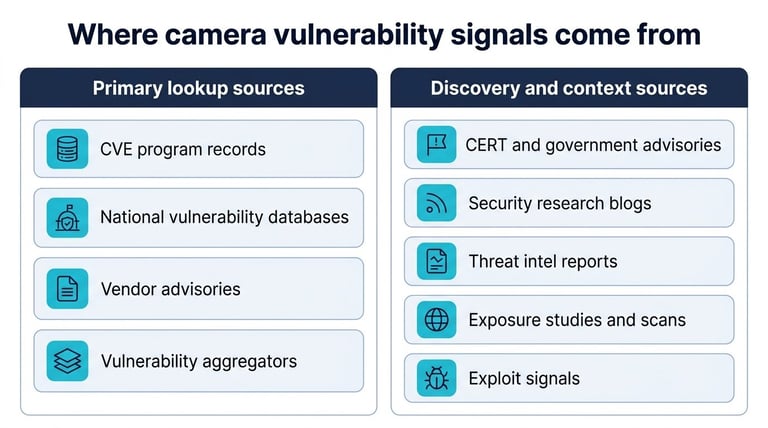
Where camera vulnerability signals come from: primary lookup sources vs. discovery and context sources
Direct CVE lookup sources
These sources are helpful when you are performing a direct CVE search. The intent here is to look up rather than discover. You could use these sources when you have one or more vulnerabilities, products, brands, or software tools in mind and want to look up CVEs for them.
MITRE CVE list
The MITRE CVE list is a publicly accessible, industry-standard repository of over 320,000 vulnerabilities maintained by the nonprofit MITRE Corporation. It also acts as a key resource for the next lookup source, the NIST NVD. The contributions to this list come from a diverse global community of cybersecurity professionals, organizations, and researchers. This list also boasts of 450+ CVE Numbering Authority (CNA) partners who are authorized organizations to identify, assign, and publish CVE records.
CVEs from this list can be searched by CVE ID, vulnerability description, or brand name. The CVE list can also be downloaded from the MITRE website as a zip file containing the JSONs for each CVE, organized by year. CVEs are also updated in the cvelistV5 GitHub repository about every 7 minutes. The CVE services API can be used to retrieve CVE information ad hoc, making this list very developer-friendly.
It is interesting to note that MITRE is a private not-for-profit organization (and also the first organization to get a .org domain name). However, almost its entire funding comes from the US federal government, as it operates several Federally Funded Research and Development Centers (FFRDCs). The maintenance of CVE lists, therefore, is very much dependent on government funding.
NIST National Vulnerability Database (NVD)
The NIST NVD is a US government repository that synchronizes with the MITRE CVE List to provide enriched data, including the severity scores of vulnerabilities (CVSS), impact ratings, vulnerability types (Common Weakness Enumeration or CWE) and affected software platforms (Common Platform Enumeration or CPE). While the MITRE CVE list is a source list containing the IDs and descriptions of vulnerabilities, NVD provides better context and actionable insights. The new vulnerabilities that get added to MITRE CVE list typically get added to NIST NVD soon, although there have been some lags recently.
The NVD website is very versatile, allowing you to search by CVE, CVSS, and even CPE. There are several advanced search filters, including status, date ranges, data types, and platforms. The portal also has a developer section, providing APIs for accessing data.
CISA known exploited vulnerability catalog
Think of this as the "most wanted" list of vulnerabilities. While the other lists focus on listing all possible vulnerabilities, this catalog, maintained by the Cybersecurity and Infrastructure Security Agency (CISA), focuses exclusively on the vulnerabilities that hackers are actively exploiting or have exploited. The three criteria for a vulnerability to be listed here are: assigned CVE, known exploitation, and known remediation.
Federal agencies are legally bound to patch all vulnerabilities in this list within a specific timeframe: Each entry has an associated deadline. Patching the vulnerabilities in this list is considered the "gold standard" best practice for the private sector and local governments as well.
The catalog is available in JSON and CSV formats to aid automation for security teams. You can also filter by relevant keywords and by vendor or project names on the website.
VulDB
VulDB has been documenting vulnerabilities, exploits, and risks in software and hardware since the 1970s. It is a certified CNA, meaning that it can assign CVE identifiers to new vulnerabilities. Its database holds over 350,000 vulnerabilities, advisories, and exploit details. It is known for fast processing and often provides insights and 0-day exploit information days or weeks ahead of other sources. It also features Cybersecurity Threat Intelligence (CTI) Interest Scores and CTI activity scores, showcasing the interest and activities of actors for certain technologies, products and vulnerabilities. It also has a separate section showing active threat actors.
The platform allows for search by vulnerability, product, software version, exploit, advisory, defense tools, and several references like CERT Bund WID, Exploit-DB, etc. Alerting and API access are available for developers (with certain limitations in the free version)
Aggregators
Several online platforms aggregate data from the direct sources to provide greater utility. Let's discuss a couple of them.
CVE Details
This is an independent third-party tool focused on summarizing and visualizing CVE data using the NVD data as the primary data source. You can use this portal to get vendor specific, product-specific, or software-specific statistics and also compare vendors and softwares. Think of this portal as an analytics layer on top of NVD data. It also helps you understand emerging CVEs (not yet published, but appearing in other documents), advisories from top companies like Microsoft, GitHub, and Cisco, GitHub issues mentioning CVEs from monitored projects, and so on. CVE Details has most of its features behind a paywall, with plans starting at $100/user/month (there is a 30-day free trial).
Standard CVE search is available on the website. You can also search for aggregate statistics by type, year, product, vendor, and software version. In addition, you can have custom RSS feeds, custom email alerts, and even API access.
OpenCVE
This platform helps you organize your vendor and product subscriptions into a project. Each project can then have independent dashboards, subscriptions, reports, and notification rules. The data is aggregated from several sources like MITRE, NVD, CISA, etc. You can get an AI-powered daily report across your projects, helping you identify the highest priority CVEs first.
Note that all search, filter, download, and notification features are project-specific, and there is no global site-wide search for vulnerabilities.
Indirect sources
These sources often tell you what to look for in direct sources. They often do the heavy lifting of analyzing thousands of vulnerabilities that are reported daily and drawing your attention to the ones most relevant to you. These sources are also often more "human" than direct sources, blending insights, opinions, and practicality with factual information.
Advisories
Several government departments and private corporations publish regular advisories for industries and consumers. For example, the US CISA adds alerts and advisories almost on a daily basis. Similarly, companies like GitHub, RedHat, Cisco, etc. also keep releasing advisories related to vulnerabilities and threats related to their products and services. These advisories can often come in before a CVE gets assigned, and if you are using cameras from certain specific vendors, it may be worthwhile checking if these vendors have their own advisory pages.
Blogs
Several popular blogs by cybersecurity firms and independent researchers often provide context behind vulnerabilities that get missed out in plain, to-the-point CVE descriptions. Their methodology of finding vulnerabilities, scale of affected devices, and what should be done to immediately contain the risk often speak to you in more human ways than a CVE description can. Several of these blogs, like Krebs on Security, Bleeping Computer and The Hacker News are general, covering all security threats.
Community platforms
Platforms like AttackerKB are community driven, where security professionals like you shed light on the exploitability and severity of vulnerabilities for the benefit of the whole community. If you find a vulnerability of interest and would like to get insights and opinions from other peers on the same, then platforms like these come in handy. Also, Reddit has several channels (like r/cybersecurity, r/pentesting, r/netsec, or r/InfoSecNews) for security professionals that are worth checking out.
AI-friendly sources
AI chatbots trained on data up to a specific timeframe can hallucinate when quizzed about the latest data. Companies like Vulners have created usage-based paid MCP servers that allow your favorite LLMs to get the latest up-to-date data from various sources. This makes the process of getting vulnerability news as simple as chatting with your favorite AI.
Hacker-friendly sources
While most of the sources discussed above focus on getting information about vulnerabilities, if you are a cybersecurity professional or hobbyist looking forward to performing the Proof of Concept (PoC) of a vulnerability exploit, say for understanding and assessing the impact, then sources like Exploit DB can come in handy. They contain a repository of exploit code linked to CVEs, and this code becomes essential for testing purposes.
Another source is the Sentient Hyper-Optimized Data Access Network (Shodan), a search engine for gathering information about devices and systems connected to the Internet. It is generally used for penetration testing and vulnerability analysis. This source, unlike others, can sometimes reveal if one or more specific devices in your fleet are vulnerable.
Brand-specific interactions
The brand that provided you with the camera likely has its own CVE list or relevant vulnerabilities maintained on its website or blog. Additionally, your point of contact (PoC), who may be a brand representative or a third-party integrator, can also provide relevant information about vulnerabilities affecting the products they deal with. Such informal or casual interactions can also often reveal a vulnerability of interest just in time.
Search, filtering, and update techniques
Processing 300,000+ vulnerabilities can be overwhelming, especially since only a fraction of them are typically relevant for you. The table below summarizes practical filter dimensions and example terms that help narrow CVE and advisory searches to camera-relevant results.
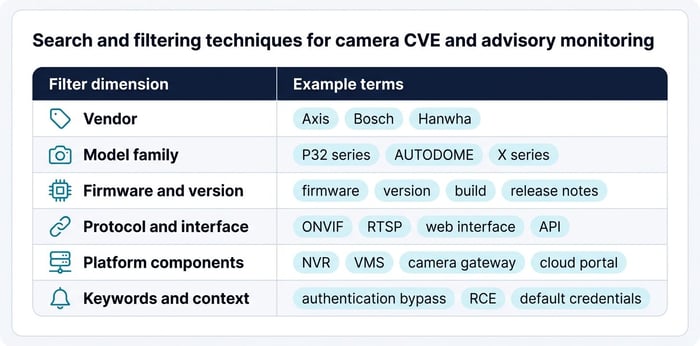
Example filters and search terms for tracking camera-related CVEs and advisories
The right search and filtering techniques can help you achieve your objectives faster. Here are a few practical tips:
1. Understand your fleet: Knowing the number of cameras, their brands and software versions can narrow your CVE search significantly. For fairly large fleets, keeping track of the information above can be quite difficult. Fleet management platforms like SecuriThings can solve this problem.
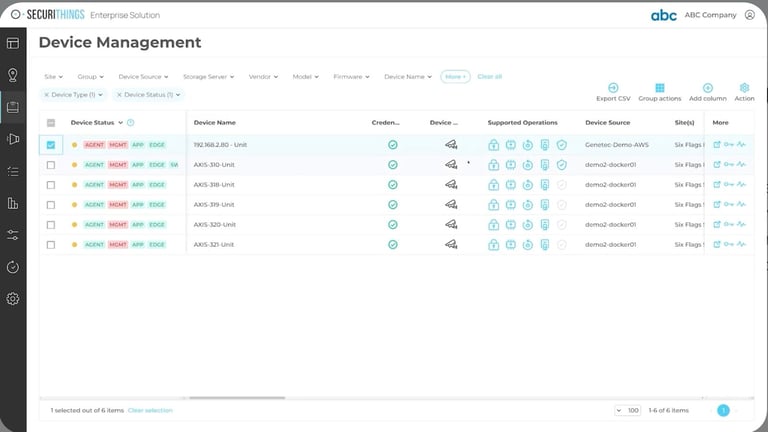
SecuriThings fleet management (Source)
2. Understand your software stack: Many vulnerabilities are not reported for specific products but rather for libraries used across multiple products. A recent popular example is the Log4j vulnerability in the Apache Log4j logging library that allowed for remote code execution. If you are unaware of the use of this library in your products, it is very likely that you will skip this vulnerability as unrelated.
3. Understand your use case: Do you want to understand the highest priority CVEs affecting your devices? Do you want to recreate an exploit? Do you want to be notified each time there is an update related to CVEs you are tracking or just a monthly snapshot is enough? Are you making a purchase decision between competing brands, or is the purchase done, and your objective is long term maintenance? Each use case can require you to use a different platform(s), and having clarity on the use case narrows down the surface area of the search significantly.
4. Sort by severity sort: Not all vulnerabilities will lead to an attack on your fleet, and not all attacks will lead to downtime or theft of sensitive data. Sorting vulnerabilities by severity helps you prioritize the most critical CVEs first. Note that severity is also very context specific: A very severe vulnerability affecting a camera in an abandoned area of your facility may not be as severe for you as a relatively minor vulnerability in the camera monitoring your vault.
5. Set up alerting: Once you have finalized the products, vendors, and software versions for which you'd like to track vulnerabilities, set up alerts for news and updates using platforms like CVEDetails or OpenCVE, or create your own custom notification routine using MITRE/ NVD APIs or web scraping.
6. Participate in community: Keep following blogs that interest you, and participate in online discussions on Reddit groups or platforms like AttackerKB to stay in touch with the latest trends and peer insights.
Conclusion
Many sources, direct and indirect, are available at your disposal for keeping yourself up-to-date with the latest vulnerability news affecting you. Filtering out the right information from the overwhelming sea of information is essential, and having the right understanding of your fleet, software stack, use case, and severity sensitivity will help you get you where you need to go faster. Automation and community participation go a long way toward keeping yourself up to date with the latest news.
Platforms like SecuriThings can offload the process of keeping track of your fleet and help operationalize the vulnerability detection workflow by providing you with visibility of your camera fleet, along with their brands and firmware versions. They can further map the CVEs and advisories to affected devices, and also suggest and execute remediation steps, like firmware updates. Consider investing in a good platform if your fleet is large enough to track manually.