Modern physical security innovations have consistently improved coverage, minimized errors, and reduced the need for human effort and oversight in physical locations. Before the advent of Artificial Intelligence (AI), innovations in the physical security industry focused on enabling humans through data collection, promoting the digitization of records, or sounding alarms in the event of rule breaches. Analyzing and acting on the data was mainly left to humans.
Today, AI is supercharging innovations and enhancing physical security in ways that were previously impossible to implement. With AI, humans gain access to an intelligent, high-throughput technology that can significantly enhance physical security and streamline operations.
This article explores AI in physical security in detail, focusing on three primary use cases: detecting physical threats in video, detecting anomalous entries and exits, and ensuring device integrity.
Summary of key AI in physical security applications
The table below summarizes the three high-level AI in physical security applications that this article will explore in detail.
| Applications | Description |
|---|---|
| Detect physical threats in live video | AI can unlock advanced security capabilities, such as real-time threat detection using pose detection, facial recognition, behavior estimation, and multi-camera tracking. However, its success relies heavily on rigorous device management. Organizations can implement these systems through tiered deployment models, ranging from simple plug-and-play gateways for smaller users to robust enterprise VMS platforms or custom-built solutions where in-house tech talent is available |
| Detect anomalous entries and exits | AI can enhance access control by cross-referencing logs and camera feeds to detect anomalies, such as tailgating, biometric spoofing, and suspicious entry patterns. Successful implementation relies on standardized data and rigorous device management, with deployment options ranging from complete system replacements to retrofit solutions and DIY development. |
| Ensure device integrity | AI can proactively monitor the integrity of physical security devices by tracking device health, detecting network anomalies such as spoofing and traffic spikes, and flagging potential physical tampering, including lens masking or angle tilt of cameras. Effective implementation requires maximizing health sensing, that is, continuously collecting device health metrics such as uptime, temperature, frame rate, and latency to identify performance or reliability issues early, enabling edge interventions like secure boot, defining clear fleet SLOs, and leveraging available integrity-monitoring software or building one from scratch. |


Monitor the health of physical IoT devices and receive alerts in real-time

Automate firmware upgrades, password rotations & certificate management

Generate ad hoc and scheduled compliance reports
AI in physical security application #1: Detect physical threats in live video
AI can analyze live video more quickly and dynamically than legacy tooling or human review. This makes the detection of physical threats in live video a prime use case for AI in physical security.
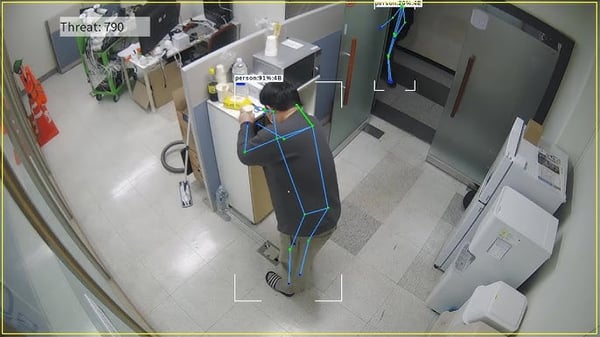
Example of threat detection from a camera feed (Source)
Opportunities
With AI on the edge, many real-time computations can be performed on the camera hardware itself. This includes facial recognition, object detection, pose detection (and subsequently activity detection). Face, activity, and object detection can often alert the authorities about a potential threat pre-emptively. For example, a stranger lurking outside the premises with a weapon is a sure threat.
Certain motorized cameras can also follow a suspicious person or object as long as it moves within their absolute field of view. If we combine edge and cloud capabilities, cameras can coordinate to keep tracking a suspicious person/object as it moves from the field of view of one camera to another. This enables security personnel to track a Person of Interest (POI) automatically. The addition of this automated tracking capability can enable security personnel to update their SOPs to improve incident response.
Further, a live camera feed (with facial recognition) can be integrated with access control system rules to detect unauthorized individuals in any location. Advanced high-resolution camera systems can even run emotion-detection models to predict intentions and flag suspicions. The overarching implication is that security personnel can now shift their focus from 'monitoring' to 'responding', as most of the heavy lifting in monitoring can be handled by AI.
Note: The opportunities with AI are promising, and possibilities are endless. While you might be rightfully excited, be aware of the costs and privacy regulations before going overboard with AI integration. Have a clear understanding of your context before determining the extent to which AI can help you.
Prerequisites
For AI integration with camera feed to be effective, teams must meet the following prerequisites:
- Camera coverage of all high-risk areas: AI can seldom act on what the camera can't see. All sensitive areas must be within the field of view of your camera network. Having said this, it is also important to strike a balance between coverage, budget, and privacy. Having cameras in all places on your premises might be financially feasible. And the all-in strategy might backfire if cameras are placed in confidential or private areas. The optimal placement of cameras needs to be audited regularly.
- Functional state and resolution of each camera: This, again, needs to be audited regularly. A dead camera covering a sensitive area is as good as leaving the area blind. Similarly, the camera's resolution needs to be appropriate for the coverage area and the level of detail desired. A blurry or pixelated feed will not give accurate results even with the best AI models. If advanced models like emotion detection need to be run, the resolution should be even higher.
- Device management: All cameras should have the latest patches installed to prevent exploitation of known camera vulnerabilities. There should be a strong password policy for the cameras, and the passwords should be rotated periodically. At scale, an enterprise device management platform like SecuriThings can do this effectively.
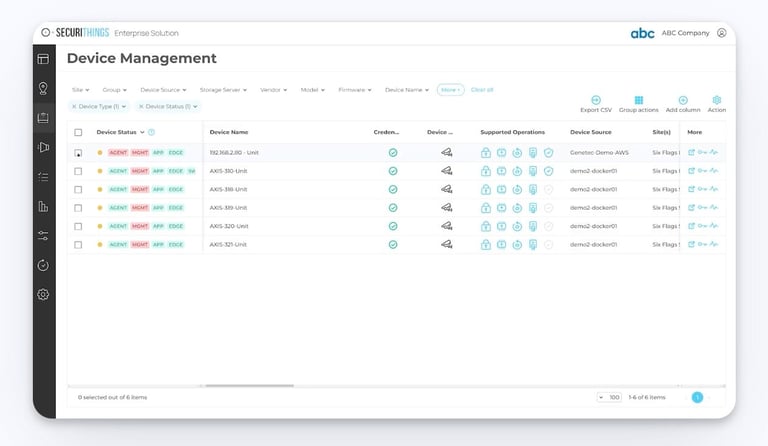
SecuriThings Device Management Dashboard. (Source)
- Centralized Video Management System (VMS) implementation: An effective, centralized VMS takes care of video collection, storage, viewing, and analytics. The VMS can also handle AI workloads that are difficult to run on the edge due to resource constraints. It is also an enabler for AI workloads requiring multi-camera tracking. Integration with other physical security elements, such as access control systems (preferably AI-enabled), is more effective with an AI-enabled VMS. An on-premises VMS can also act as a bridge to transmit the video feed to cloud storage
Getting started with AI-enabled physical threat detection in live video
The first step is to understand the capabilities and bandwidth of your existing team. Once that is done, one of the following three approaches can be taken to use AI for physical threat detection in live video:
- Plug-and-play route: This is the best choice if you are an SMB, Retail outlet, or a corporate office and do not have a strong data science team. You can purchase a 'bridge' or 'gateway' device that connects to your existing network, pulls videos from your cameras, processes them, and sends alerts to a cloud dashboard. Example vendors in this space are Spot AI and Eagle Eye Networks.
- Enterprise software route: Best for the scale that comes with an implementation for a large factory, campus, or smart city. These video management and physical security software tools include built-in AI plugins that can be customized to meet specific requirements. They can sit on a local server or split the load between local and cloud servers. Example vendors are Milestone XProtect and Genetec.
- Builder route: This is the preferred route if you have an in-house tech team and very niche applications that cannot be served by solutions available in the market. Open-source tools and cloud services such as Azure AI Video Indexer or NVIDIA Metropolis can be used to develop your own custom solution. Tools like NVIDIA DeepStream and Azure Percept can also help with edge AI development.
Once you have adopted the right strategy for moving forward with your AI adoption journey, it is also worthwhile to regularly assess the chosen path. For example, you may start with a plug-and-play approach, but as your business grows, you may want to switch to enterprise software, and finally, when you have a capable team with enough bandwidth, a switchover to the builder route may make more sense.
Even if you choose to continue with the chosen path, a periodic assessment could help you understand if newer technologies and tools are available to help you do the same tasks in a more efficient, more accurate, or more cost-effective manner.
AI in physical security application #2: Detect anomalous entries and exits
Ensuring security at physical entries and exits is a fundamental physical security use case. AI's analysis capabilities make it an excellent tool for detecting anomalies at ingress and egress points that would otherwise fly under the radar.
Opportunities
AI integration into access control systems can help them analyze entry and exit patterns and flag anomalies. Suppose a person enters daily at 9 AM and leaves around 5 PM. Now, if that person's badge is suddenly used to enter at 10 PM, AI can flag that event as anomalous. Linked CCTV cameras can help verify whether the badge-holder is an authorized person. Similarly, if a person starts making too many entries in a sensitive area, that pattern may be flagged by AI as suspicious.
Camera feed linked to access control systems can help AI detect tailgating or piggybacking. AI can also detect biometric suspicions. For example, if a fingerprint pattern used for entry is exactly the same day after day, with no variations to indicate a different finger placement, AI can suspect malicious activity, including hacking. Order of events can also help AI detect anomalies. For example, if there are more exit records than entry records for a person, there might be an untracked channel the person is using to enter.
You can perhaps appreciate that all of the above being done by a human on vast amounts of data with consistently low error rates is virtually impossible. That's where the huge advantage of AI comes in. Humans can still take the final call, and it might be necessary to keep a human in the loop to avoid security from becoming faceless, indifferent, and inhuman, but AI can make their work significantly easier.
Prerequisites
To use AI to support the detection of anomalous entries and exits, teams should ensure that these prerequisites are met:
- Compliance: Ensure any data exposure to AI is handled in a manner that doesn't violate applicable privacy regulations (e.g., GDPR, HIPAA). You may need to modify the implementation significantly to ensure this (including deployment of on-premise GPUs rather than relying on cloud models). Get your implementation plan vetted by a legal expert before executing it.
- Standardized logs: It is important that all access control systems follow the same format for data generation and transmission. If the logs from all the access control systems come in different formats, custom development will be required for AI to compare different log streams.
- Centralized log lake: The AI system will need to access past logs to understand patterns and behaviors. A centralized lake helps.
- Unique identities: Each access control touchpoint should be uniquely identifiable. Similarly, all access cards/ other access modalities should be unique. Any duplicates can render the data and the analysis inconsequential.
- Trained staff: When AI flags suspicions, the staff should be trained with detailed SOPs and policies to act on them. Depending on the severity of the suspicion or the sensitivity of the premises being protected, a zero-trust model can be employed with 'Deny + Investigate' SOC runbook.
- Device Management: Most importantly, the devices generating the data for the AI should be up and running in good health at all times. The uptime of all access control devices should be continuously monitored. Their health checks should be performed periodically, and the latest security patches should be applied as soon as they are available. Password rotation, if required, should be done on time. An enterprise device management platform like SecuriThings can help teams address this prerequisite.
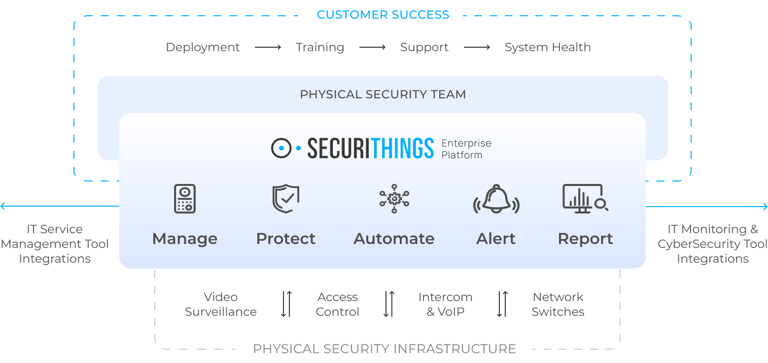
SecuriThings Services that support physical security infrastructure. (Source)
Getting started with detecting anomalous entries and exits
Depending on your current state of physical security infrastructure and team capabilities, the following are the ways to get started:
- Turnkey AI Systems (Rip and Replace): If your existing infrastructure is outdated, the best strategy is to replace it with a modern, AI-enabled system. Solutions like Verkada and Avigilon are examples.
- Retrofit AI solutions: If you are not looking to completely replace your existing infrastructure, you can add an AI layer on top with the help of retrofit devices. Check out the product offerings from companies like BioConnect and Alcatraz.
- DIY solution: If you have a competent development team, you can build your own AI layer on top of your existing infrastructure. Consider open-source tools like Leosac, Python libraries like OpenCV, and models like YOLO.
AI in physical security application #3: Ensure device integrity
Spoofing, failing devices, and maliciously injected video feeds can undermine an otherwise strong physical security program. AI capabilities can help counter these threats and enable organizations to take a proactive approach to maintaining security device integrity.
Opportunities
Along with detecting and preempting threats with physical security equipment, AI can also help monitor the integrity of that equipment. To begin with, simple periodic health checks and monitoring of device vitals, like temperature, resolution, frame rate, latency, etc., can be performed. Any anomaly in device health can be notified.
AI can even go a step further and flag unknown MAC IDs on the network. For camera devices, it can detect spoofing, replays, and injected feeds. It can also accurately predict physical tampering with the camera, including lens masking, lens tilt, and defocus/blur. It can verify the clock integrity of all devices, and even a few milliseconds of drift could hint at potential health issues or tampering attempts. It can monitor network traffic spikes to alert on unusual activity.
Further, AI can help execute auto-remediation workflows, including automated reboots, firmware rollbacks, and credential rotation across the network. Of course, these activities require a device management strategy in place and some data being captured for the AI to act upon.
Prerequisites
Before using AI to support device integrity use cases, these prerequisites should be met:
- Health monitoring enablement: The better the data quality, the better AI models can perform. So, maximizing the health and sensor logs that reach the AI system can help maximize the device integrity coverage.
- Edge interventions: Any safety measure that can be implemented on the edge can help ease AI's task. For example, if all devices have flash encryption and secure boot enabled, then physical firmware tampering is one less complex thing for AI to infer.
- Defined fleet Service Level Objectives (SLOs): Well-defined SLOs can help AI understand when to raise an alarm. Some example SLOs are:
- Tamper-free availability: 99.5% of the video feed should be free of occlusion or focus degradation.
- Firmware compliance: 99.9% of devices should have upgraded to the latest firmware within 24 hours of its release. Enterprise device management tools, such as SecuriThings, can help here.
- Attestation success rate: 95% of devices must pass a cryptographic challenge every hour.
- Network segmentation: If security devices are on a separate, isolated subnet, it can make AI's job easier, as all the required traffic is in the same, segmented network location.
Getting started with device integrity checks
Device integrity checks are primarily software-driven. There is software available to help you monitor the integrity of the devices connected to your network. Examples include Actuate.ai and Ai-RGUS. You can, of course, build your own software with custom health check rules and a monitoring frequency that suits your needs. You can use tools like Keylime (for TPM 2.0 compliance) and Python libraries.
Conclusion
AI in physical security is no longer a nice-to-have for modern organizations. It's a must-have given the benefits and cost savings from threat mitigation and proactive detection of device failures.
With the integration of data from other smart appliances on the premises (occupancy sensors, smart HVAC devices, smart lighting, etc.), AI models can be trained to detect more subtle anomalies. Monitoring the integrity of the monitoring devices is icing on the cake. Simply put, AI-powered physical security is much stronger than traditional physical security tools alone.
As organizations modernize their physical security infrastructure with AI, maintaining visibility and control over every connected device becomes crucial. Platforms like SecuriThings enable continuous monitoring, health verification, and automated maintenance across large fleets of devices.