Physical security device management has become an operational requirement for enterprises running large, distributed fleets of cameras, access control systems, intrusion devices, and supporting infrastructure. As these environments scale across sites and vendors, teams need the same discipline expected in mature IT operations: accurate inventory, consistent configuration, continuous health monitoring, controlled change, and audit-ready reporting.
The term "physical security device management" is still interpreted inconsistently across the market. This article provides an engineering-focused guide to the tool categories typically used in enterprise physical security device management, with an example for each.
It explains what each category is responsible for, the capabilities that matter most, and how these categories work together as a practical toolchain to improve uptime and strengthen cyber hygiene.
Summary of key features for physical security device management tools
| Tool category | Description | Usage | Limitations | Example |
|---|---|---|---|---|
| Physical security device management platforms | Tools built to manage multi-site, multi-vendor physical security devices as a fleet. |
|
Require human oversight for approvals and exceptions. | SecuriThings |
| Manufacturer ecosystems for cloud-managed security | Vendors that provide a tightly integrated hardware-and-software stack, often centered on cameras. | Optimized for simpler, single-vendor fleets with lower flexibility and compliance requirements. | Easiest to deploy and operate only when an organization standardizes on one manufacturer. | Verkada, Rhombus |
| Video management platforms with device administration | Platforms centered on video operations. |
|
Rely on manual workflows since the platform is optimized for video operations, not fleet maintenance. Coverage is also ecosystem-bounded, and more limited once you move beyond cameras | Genetec |
| Access control platforms with device management | Solutions focused on identities, credentials, doors, and access policies. | Basic monitoring and administration for controllers and readers, plus audit trails. | Device management capabilities are typically narrow and centered on access control, with limited coverage for cameras and other physical security devices. | Brivo |
| Asset visibility and cyber risk platforms for IoT devices | Platforms that provide device discovery and cyber risk visibility for IT environments, including some physical security devices. | Better aligned to IT users than to physical security operations and maintenance. | Typically, monitoring-only and do not support remediation workflows or configuration changes on physical security devices. | Armis |


Monitor the health of physical security devices and receive alerts in real-time

Automate firmware upgrades, password rotations & certificate management

Generate ad hoc and scheduled compliance reports
Physical security device management platforms
Enterprise physical security teams rarely manage a single, uniform stack. As fleets expand across sites and vendors, device management becomes an operational discipline requiring continuous monitoring, controlled change, and repeatable workflows.
These platforms let you see what's happening and actually do something about it. They automate the tedious maintenance tasks, alert teams when appropriate, and help organizations meet compliance and governance requirements across large operations.
Such platforms can manage devices from start to finish, turning device management into an operational backbone. You get real-time visibility, streamlined workflows, and built-in cyber protection. It all sits atop a robust data layer, tightly integrated with the enterprise.
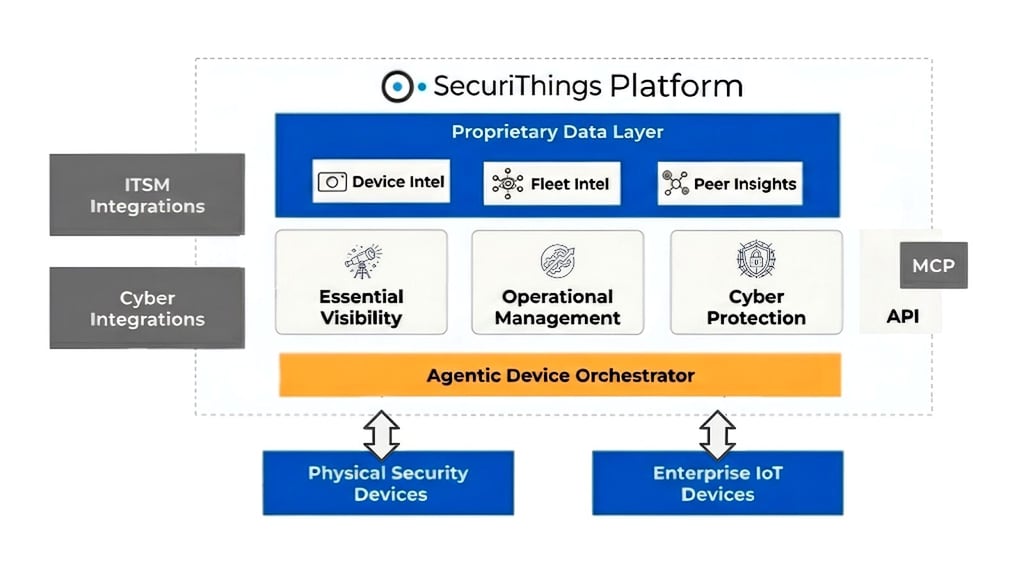
SecuriThings platform overview showing device orchestration, visibility, operations, and integrations. (source)
For example, SecuriThings is built to manage physical security devices spread across different sites and vendors. You get automation for everyday workflows, but there's still room for people to oversee and take action when needed.
Why to use
In enterprise environments, physical security device management becomes a fleet problem. A few cameras or panels can be managed with local tools and periodic checkups, but large deployments quickly become a mix of sites, models, firmware versions, credentials, certificates, management systems, and unclear ownership. At that point, device management stops being occasional maintenance and becomes a continuous operational discipline that must scale across many locations and vendors.
Global companies often face unique challenges due to local laws and regulations governing business activities, such as:
- Compliance requirements
- Import restrictions on where a company may source its products
- Specific brand requirements that restrict a company's ability to use only approved vendors in certain countries.
Consequently, maintaining a single global vendor for all of the company's operations across all of the company's countries can be quite challenging.
SecuriThings can flag devices running outdated firmware or overdue credential rotation and then run an approved workflow to remediate at scale, with human oversight for exceptions and change control.
What these platforms are responsible for
A physical security device management platform enables you to centrally manage the security devices you use (such as alarms, card access systems, cameras, etc). Rather than relying on conventional methods like excel spreadsheets to know what equipment you have, these platforms allow you to find:
- Where all of your equipment is located
- Who owns each device
- Information about the equipment condition, etc.
You will have constant visibility into the overall health of your physical security device inventory (e.g., security systems), be able to identify whether configuration changes were made, and ensure that the systems are properly configured according to your standard specifications.
Updating firmware and credentials can be a hassle because multiple vendors and locations are usually involved. These platforms help you deploy updates and changes in a coordinated fashion and allow you to effectively track the entire lifecycle of a device, from initial deployment to decommissioning.
These platforms also help ensure compliance with IT standards and regulations. They show that the equipment conforms to established policies, every action taken is recorded, and you have clear reports demonstrating what changes occurred and when. All this information comes together to help you reduce the risk associated with a physical security event and achieve an audit-ready state.
Monitoring plus action, with automation and human oversight
Monitoring tells you what is unhealthy, misconfigured, or overdue for maintenance. Device management platforms support actions to resolve issues through workflows that can be automated where appropriate, with human oversight for approvals and exceptions. This is the difference between knowing that a fleet is drifting and being able to bring it back into an approved state in a controlled, repeatable way.
Automation makes many physical security management tasks cost-effective when scaled across multiple locations, such as:
- Credential rotation
- Staged firmware upgrades
- Certificate lifecycle management
- Remote restarts
- End-of-life planning
Doing these tasks manually can be time-consuming and increases the risk of downtime. The goal isn't to eliminate personnel but to replace unscalable manual processes with permissioned and auditable changes.
End-to-end operations across the ecosystem, not device-only fixes
Physical security solutions for enterprises function as a distributed system. A camera or controller alone is a small piece of a complete system comprising other parts, including management servers, cloud services, identities/permissions, network paths, storage, and the downstream consumers of those devices (monitoring centers and incident workflows).
An end-to-end approach treats maintenance as one coordinated change across interdependent components. Rather than just asking, "Can we change this unit?" the team should ask,
- What else may be impacted when this unit is changed?
- What else needs to change when the device configuration changes?
- How do we ensure that the change was successful?
An end-to-end approach becomes even more critical in mixed fleets due to differences in site networks, device models, and management systems. Changes must be sequenced, staged, and validated so that all dependent systems remain in sync; otherwise, they should not be permitted.
For teams that standardize on a single vendor and want a streamlined, cloud-managed experience, manufacturer ecosystems can meet many day-to-day needs in a single, tightly integrated stack.
Based on the fleet size, how similar the hardware is, and what is important for daily operations (governance, visibility, security), each tool type will have its own environment where it works best. The table below shows where each tool type typically fits in practice based on these variables.
| Environment | Most common fit | Typical reason it fits |
|---|---|---|
| Startup or small business with one vendor | Manufacturer ecosystems for cloud-managed security | Fast rollout and simple operations when the fleet is standardized |
| Small to mid-size organization with a video-first workflow | Video management platforms with device administration | Operators work in the VMS daily, and basic device admin is often enough |
| An enterprise with many sites and mixed vendors | Physical security device management platforms | Fleet operations, standardization, and compliance need to scale across locations |
| Organization is primarily focused on doors and identities | Access control platforms with device management | Centralizes credentials, policies, and audit trails for access devices |
| An IT-led organization focused on discovery and cyber risk context | Asset visibility and cyber risk platforms for IoT devices | Broad inventory and risk monitoring across connected devices, typically without device actions |
Manufacturer ecosystems for cloud-managed security
Manufacturer ecosystems combine hardware and cloud software into a single, tightly integrated stack. They are most effective when an organization standardizes on one manufacturer and wants a streamlined deployment and operating experience across sites.
What this tool type is and when it fits
Manufacturer ecosystems for cloud-managed security bundle hardware and software into a tightly integrated stack, often centered on cameras and extended with related components such as sensors, intercoms, and access control. The main advantage is simplicity, as the manufacturer controls both ends of the system. Deployments can be faster to roll out, easier to standardize, and more straightforward to operate day-to-day when you want a consistent experience across sites. This tool type is easiest to deploy and operate when the organization standardizes on a single manufacturer's hardware.
Example vendors in this tool type include Verkada and Rhombus, which provide cloud-managed ecosystems where the management experience is tightly coupled to the manufacturer's devices. In a single-vendor deployment, these tools can onboard new devices through a cloud console and apply standardized settings across the manufacturer's fleet from a single place.
Vendor-specific by design
The basic nature of this tool type is that its management layer is designed solely to work with the manufacturer's devices. This design feature allows the vendor to optimize onboarding, device health visibility, and daily hardware management. The ecosystem works best when you, as an organization, choose to make that vendor your standard and see that the majority of your operations are going to run on that vendor's platform.
How the device management layer typically behaves in practice
Compared to purpose-built physical security device management platforms, manufacturer ecosystems usually concentrate on the operational controls needed to run their own stack smoothly. The device management layer tends to be oriented toward enabling the product experience, rather than providing a flexible operations layer that must adapt to diverse device mixes and stricter governance requirements.
The practical implication is that the device management model often assumes uniformity. Policies, workflows, and reporting are usually defined around the vendor's device model and cloud platform assumptions. When those assumptions are valid, teams can act swiftly. When fleets expand through acquisitions or inherit different vendors, organizations supplement their ecosystems with additional tooling and processes.
Where these ecosystems sit in an enterprise toolchain
Manufacturer ecosystems function as the operational system of record for a specific hardware footprint. They can be an effective "site standard" for locations built around a single vendor, especially when the organization values centralized cloud administration and rapid provisioning.
Companies with many operational locations and numerous guidelines and rules generally require an overarching operations layer to ensure consistent governance and compliance and to normalize their inventories across locations.
If a company uses video operations as the "central" mean of monitoring its field operations and conducting its investigation process then the primary means of managing and controlling the use of video in the field environment will typically involve an integrated or interconnection approach between the video management platform and the organization's existing Infrastructure with regard to the administration of their CCTV cameras, camera recording and the overall function and consistency of their CCTV operations.
A company's enterprise-wide physical security strategy ensures uniform implementation throughout all respective locations. The policy stipulates acceptable use of single-vendor systems, establishes adherence to specific standards (such as security baselines across a company's facilities, change management procedures, lifecycle planning, and compliance reporting), and ultimately governs how companies should handle regional exceptions when vendor use differs.
Video management platforms with device administration
Many security operations rely on Video Management Systems (VMS) as their operational backbone. Most teams rely on a VMS for live-stream monitoring and recording, as well as conducting investigations. Some VMS also provide an additional layer of device administration that connects different cameras and offers reliable video workflow capabilities. The depth of video maintenance varies, depending on the vendor and its ecosystem.
What this tool type is built for
The primary purpose of video management platforms is to support standard video operations such as live viewing, recording, retention, permissions, and workflows associated with investigative, scanning activity, and security operations. It becomes the operational hub for day-to-day operations.
Genetec would be considered one of the best examples of such a tool, extremely common for video operations, and providing a method of device administration for its supported device portfolio. Operators can troubleshoot camera connectivity issues, perform basic device diagnostics, and adjust settings on their supported devices used for monitoring and investigation.
Where the device administration layer helps
Most video management solutions come with administrative features that help ensure video reliability. These functions typically allow your team to check whether a camera is connected and streaming, run limited diagnostics, and make minor configuration changes supported by the VMS. Since these tools are located near the operator workflow, they are usually the first place your team looks at when you experience a feed drop, degraded performance, or when a device starts acting erratically.
How this tool type differs from purpose-built device management
The main difference is functionality. Many of these videoOps platforms were developed with a specific purpose: to optimize video operations, so most of the available device upkeep capabilities focused on functionality rather than on developing a comprehensive fleet operations layer. Maintenance work processes generally rely heavily on manual steps and operator input, which significantly limit flexibility when a team wants to establish custom-based maintenance policies across multiple locations and device types. This issue becomes increasingly prevalent as businesses expand their environments beyond cameras into larger physical security fleets, and as organizations require consistency in their governance/reporting across multiple systems.
Ecosystem boundaries and why they matter
Many camera integrations are supported by video management platforms; however, video coverage depends on what was integrated into the VMS platform and how the integrations are managed. The level of administration available for each device depends on the specific model, manufacturer, and deployment architecture. Other areas of the physical security ecosystem do require additional tools to ensure continuity in fleet operations and maintenance across multiple installations.
How this tool type fits into enterprise environments
In large enterprises, an organization's VMS often becomes, or remains, the main point of operation for video, while device management is split across different groups or entities. Other operational processes and systems are necessary to maintain the same standard of care, manage and complete the lifecycle planning of other types of devices, and provide reliable, audit-ready reporting.
Alongside video, access control systems are often used in their own management layer focused on identities and door policies, with a lighter device management component for controllers and readers.
Access control platforms with device management
The solutions provided by this type of tool focus on identity management, credential management, door management, and access policy management, as well as access control hardware management features (e.g., controllers and readers). Overall, most standard daily access workflows include provisioning users, managing user roles and permissions, monitoring door activity, and maintaining an audit record of all access decisions.
Device management capabilities for this type of solution generally consist of basic administration and monitoring access control devices, rather than managing a complete fleet. Brivo is an example of this tool type, frequently used in environments where the primary requirement is centralized credentialing and door-access administration, with a lighter device management layer for the underlying access control hardware. A security admin can provision credentials, enforce door access policies, and review access events in the audit trail, as well as perform basic administration for controllers and readers.
This category typically complements other tools rather than replacing them. In fact, access control platforms can continue to serve as an organization's system of record for both identities and for door policies.
To provide visibility beyond physical security tools and increase understanding of connected-device exposure for the organization, IT teams typically use third-party asset visibility and cyber risk tools, since most of these tools monitor only for physical security operations.
Asset visibility and cyber risk platforms for IoT devices
Asset visibility and cyber risk platforms provide enterprise-wide discovery and monitoring for connected devices. However, for physical security, they are typically monitoring-only and are primarily designed for IT and cybersecurity workflows rather than hands-on device maintenance.
What this tool type is designed to do
Cyber risk platforms are primarily used by cybersecurity and IT teams that require extensive discovery and risk context across large environments. The primary objectives focus on helping organizations prioritize their response and investigation efforts.
- Identify all connected devices
- Create an inventory of those devices with contextual attributes
- Display relevant exposure signals
For organizations that don't regularly have reliable visibility into all devices connected to their networks, they provide an efficient way to establish a baseline inventory and improve cyber risk awareness at scale.
Armis is an example of this tool type, providing wide visibility and security context as an asset intelligence and cyber exposure platform across connected environments. An IT security team can discover unmanaged devices on the network and enrich the inventory with risk context to prioritize investigation.
Monitoring-only for physical security operations
Typically, asset visibility and cyber risk platforms are purely monitoring. They allow teams to see that devices are in place and to be aware of general exposure levels; however, they do not provide an operational control layer for the physical security infrastructure. The tool may confirm a device is present on the network, but it won't be able to pull the detailed health and configuration data that physical security teams rely on for maintenance and troubleshooting.
Physical security teams take a different approach to operating than IT and cybersecurity personnel. Their emphasis is on uptime, coverage, and keeping devices at various locations operational, along with established responsibilities and predictable maintenance procedures.
Such platforms do not support the execution of daily maintenance processes (e.g., rotating credentials, pushing firmware updates, managing certificates, or performing remote remediation steps).
If a device is either out of date or not configured correctly, the only means of restoring it is through controlled changes to bring it to an approved, functioning state. Therefore, a separate tool type is typically required for physical security operations to execute daily maintenance tasks consistently across locations and vendors.
How this tool type fits into an enterprise toolchain
These tools can be used to identify devices that may be outdated, odd, or pose a risk, but generally, operational follow-through occurs within tools designed specifically for the physical-security-maintenance workflow.
Assigning systems to their respective areas of strength relates to this division: through enhanced asset visibility, you have access to enterprise-level context; through security tools, you help maintain device stability and compliance.
Conclusion
The best approach is to identify and evaluate your current tool sets, their placement or purpose within your current environment, and the other tools or capabilities necessary to maintain consistent operations and good governance across the organization as you expand.
Next actions include identifying gaps in your inventory, health visibility, controlled change, and repeatable, safe actionability. The aim is not to replace each existing infrastructure component, but rather to create a toolchain that links your current systems used for both video and access to a new operational layer, which provides standardized maintenance, controls changes across various dependencies, and creates audit-ready reporting.
The SecuriThings solution has been created to streamline the management of physical security devices through an efficient, all-in-one platform that provides continuous monitoring, enables automated routine maintenance procedures with human oversight, and assists organizations in maintaining compliance across their multiple sites and multiple vendor security device fleets.