Physical security is the foundation of every safe and reliable organization. It protects people, property, and information from threats that can disrupt operations or cause harm.
This article examines best practices for physical security, drawing on principles derived from government, infrastructure, and enterprise frameworks. It outlines practical steps for building a comprehensive program from governance and planning to surveillance and day-to-day operations.
Summary of key best practices for physical security
| Best practices | Description |
|---|---|
| Establish a structured security governance program. | Develop an enterprise-wide framework of physical security. Assign clear roles, set measurable objectives, and regularly review performance. |
| Design your security approach based on credible risks. | Understand what to protect.
|
| Manage access intelligently through layered authorization. | Lower insider risk and prevent unauthorized access.
|
| Integrate monitoring systems for visibility and rapid response. | Combine IP cameras, CCTV, motion sensors, and environmental detection into a unified platform. Utilize analytics and automation while maintaining human oversight. |
| Manage security devices as critical assets. | Treat cameras, access panels, and sensors with the same rigor as IT systems. Maintain accurate inventories, automate health checks, and plan for firmware updates and end-of-life replacement. |
| Build operational readiness through training and accountability. | Keep personnel prepared for potential incidents.
|
| Design facilities that naturally support security. | Include natural visibility and clear territorial boundaries.
|
| Evolve your security program through regular validation and learning. | Conduct periodic reviews, certifications, and benchmarking. Capture lessons learned from incidents to refine procedures and plan for scalable upgrades. |


Monitor the health of physical security devices and receive alerts in real-time

Automate firmware upgrades, password rotations & certificate management

Generate ad hoc and scheduled compliance reports
Establish a structured security governance program
The key elements of a strong physical security governance program work together as a continuous cycle. The graphic below summarizes the core components that ensure structure, accountability, and ongoing improvement.
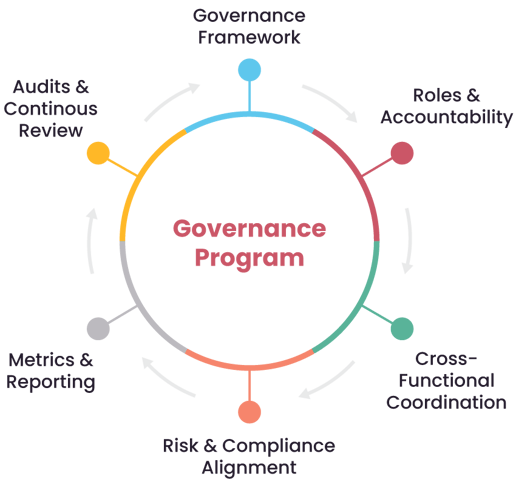
Core components of a structured physical security governance program
Governance framework
Governance requires a documented framework that outlines the organization’s security objectives, mandatory controls, and operational expectations. This framework should include standards, procedures, and incident playbooks, each with clear ownership, version control, and scheduled review cycles.
A mature governance program integrates physical security into this broader enterprise risk management structure. Physical risks should also be documented in the enterprise risk register, assigned to risk owners, and linked to mitigation measures.
Physical security controls must align with regulatory obligations, safety protocols, and the organization’s risk appetite.
Roles and accountability
Effective governance depends on clearly assigning responsibilities.
- Executive leadership defines risk tolerance and approves major investments.
- Designated security program owner oversees implementation, reporting, and long-term planning.
- Supporting teams such as facilities, IT/OT, HR, and site-level personnel hold defined operational duties.
Assign responsibility for every security activity and document who owns, executes, and reviews each action.
Establish a cross-functional council or working group that includes security, IT/OT, HR, legal, compliance, and facilities. That way, you can align all security-related decisions and prevent fragmented processes.
Metrics and reporting
Governance becomes actionable when it is measurable. Data-driven insights help identify trends, prioritize improvements, and guide resource allocation.
Establish key performance indicators (KPIs) like device uptime, credential hygiene, response times, audit results, or training completion rates. Create a security KPI dashboard and review performance on a consistent operational and strategic cadence.
To make governance actionable, organizations need centralized visibility into how their systems are performing. This is where platforms like SecuriThings add value by consolidating device status, configuration compliance, and performance metrics across all sites, providing leaders with accurate, real-time insight into their physical security posture.
Design your security approach based on credible risks
The diagram below shows how broad risk information is gradually refined into specific physical security requirements and design criteria.
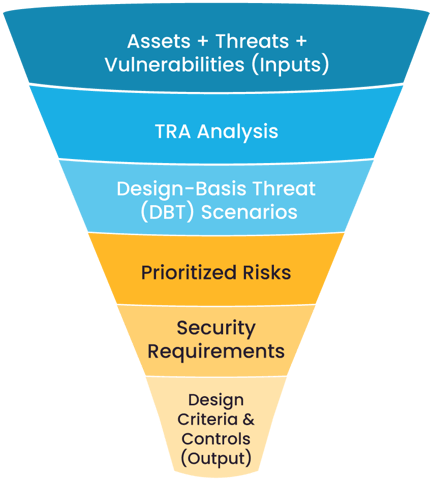
Risk assessment funnel for security design
Threat and Risk Assessments (TRAs)
A TRA analysis brings together asset information, threat intelligence, environmental factors, and potential impacts into one structured evaluation. This process helps highlight where the organization is truly exposed rather than where it merely feels vulnerable.
Require a TRA for new sites, major upgrades, or operational changes so you always start from verified risk data.
Design-basis threat (DBT) scenarios
DBTs turn high-level threats into practical narratives that guide design decisions. For example, it describes how an intruder could attempt entry through a delivery entrance during shift changes.
These scenarios help staff align on realistic adversary behavior and understand which controls would interrupt it. Use DBTs to make planning more concrete and to support decisions around barriers, monitoring, and response capability.
Prioritized risks
Risk-impact analysis allows you to evaluate the likelihood of each scenario and the severity of its consequences. Use a risk-impact matrix to focus time and investment on the vulnerabilities that matter most.
High-impact risks, especially those involving life safety or operational continuity, typically justify more robust protective measures. Lower-level risks may be addressed with administrative controls, training, or routine monitoring.
Planning and design requirements
Risk information must be incorporated into project documentation and specifications to keep projects aligned with actual risk levels.
For example, TRA outputs inform camera locations, perimeter standards, access control logic, power redundancy, safety systems, and site procedures.
Review and update TRAs
Risk conditions evolve as operations change, new technologies are deployed, or external threats shift. A TRA that was accurate two or three years ago may no longer describe current realities.
Refresh your TRA on a scheduled basis to maintain an accurate view of your risk environment. Significant incidents, system failures, or organizational changes should trigger an immediate review.
Manage access intelligently through layered authorization
Traditional badge-only systems are no longer sufficient, especially in environments with sensitive equipment or unrestricted public movement.
Use multi-factor access controls
Multi-factor authentication (MFA) using combinations such as badges with PINs, biometrics, or mobile credentials strengthens access control by requiring more than a single factor to validate a user. In addition to MFA, modern systems increasingly rely on identity-based access, where permissions are tied to an individual’s verified profile rather than to a generic badge or credential. This helps prevent issues such as shared credentials, cloned cards, or orphaned access rights.
Apply MFA in high-risk areas and ensure that access rights are linked to individual user accounts so permissions remain accurate and cannot be transferred or misused.
Apply layered authorization
A layered authorization model assigns access based on job roles, job location, and time of day. Define access zones so people only access areas where their work requires it.
For example, staff who only need access during working hours or for specific areas should not retain unrestricted 24/7 permissions. High-security zones, such as server rooms, substations, and control centers, should be limited to specialized roles with explicit approval.
Centralize credential management
Managing access across multiple sites becomes difficult when each location uses its own processes or systems. Centralized access management creates a single source of truth for granting, modifying, and revoking permissions. It also allows administrators to track credential status and generate audit trails for compliance reporting.
SecuriThings allows you to correlate access events with device behavior, helping security teams detect patterns such as repeated failed access attempts or unusual entry behavior across sites.
Configure fail-safe and fail-secure access
Different doors require different behaviors during emergencies. Some must unlock to support evacuation, while others must remain locked to protect critical assets. Map each access point to its operational and safety function, then configure fail-safe or fail-secure behavior to match real-world needs like fire codes, safety requirements, and operational risk.
Integrate physical access with digital identity systems (IAM)
Modern environments benefit from integrating physical access control systems (PACS) with identity and access management (IAM) solutions used for IT systems. That way actions such as onboarding, role changes, and offboarding automatically update physical access rights, reducing lag time and human error.
Link PACS with IAM tools so personnel records, HR data, and IT privileges update physical access permissions automatically.
Strengthen third-party access workflows
Visitors and contractors often introduce elevated risk because they require temporary access but lack ongoing accountability. A structured workflow, including pre-registration, identity verification, escort requirements, and badge expiration, helps control movement without disrupting operations.
Implement a process that validates identity, limits movement, and automatically revokes access when no longer needed.
Integrate monitoring systems for visibility and rapid response
Managing separate systems creates blind spots and slows response. A unified monitoring platform consolidates alarms, video, access events, and environmental data, giving operators one place to assess situations.
Centralize all monitoring feeds so your team has a complete, real-time picture of activity across every site. 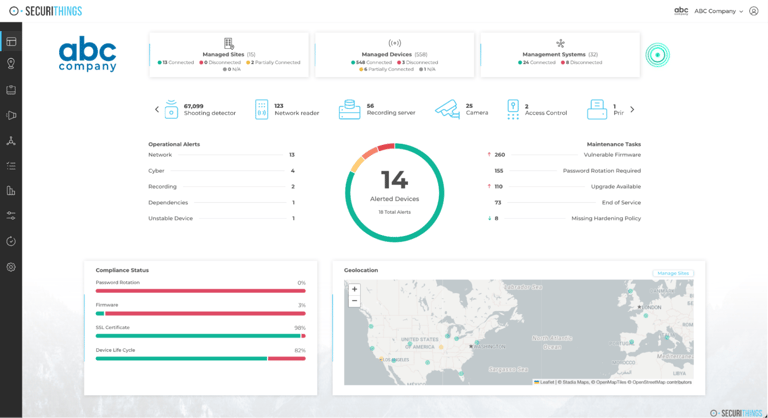
Unified monitoring dashboard showing real-time alerts, device status, compliance indicators, and site visibility. (Source)
Use analytics and AI to identify unusual activity earlier
Modern analytics can spot patterns that humans overlook, such as loitering, perimeter breaches, tailgating, or movement in restricted zones. These tools shorten the time between detection and investigation while reducing manual workloads.
Enable analytics for high-risk areas to increase detection speed and reduce reliance on constant human monitoring.
Define clear alarm categories and escalation workflows
Alarms are only useful if teams know how to respond. Classifying alarms by severity - critical, high, medium, low- helps operators prioritize attention and avoid alert fatigue. Create simple alarm categories and a step-by-step escalation plan so operators always know what action to take.
Establish a centralized operations center (GSOC or local equivalent)
Centralize monitoring responsibilities so alerts are reviewed consistently and responses are coordinated efficiently.
A centralized operations team, whether virtual or physical, improves coordination during incidents. Operators can analyze alarms, check video feeds, and communicate with on-site staff quickly.
SecuriThings supports this approach by consolidating alerts, device health data, and operational insights into a single dashboard, reducing manual effort and enabling faster, coordinated responses.
Integrate monitoring data with incident response tools
Alert information should feed directly into incident logs, case management systems, or digital playbooks. This improves documentation, speeds up handoffs, and creates a richer dataset for after-action reviews.
Connect monitoring outputs to incident-reporting tools so that every alert can be tracked, documented, and analyzed.
Manage security devices as critical assets
Without a complete device inventory, organizations struggle to detect failures, enforce standards, or plan upgrades. An accurate inventory should capture device type, location, firmware version, configuration, network status, and ownership.
Create a centralized inventory that tracks every device, and update it whenever new hardware is added, moved, or removed.
Continuously monitor device health and connectivity
Devices can fail, go offline, lose recording functionality, or drift out of calibration without anyone knowing. Continuous health monitoring provides early visibility with additional insights into issues like network drops, tampering, poor image quality, or storage failures.
Use automated tools to monitor device health so faults are detected early and corrected before they impact security operations. 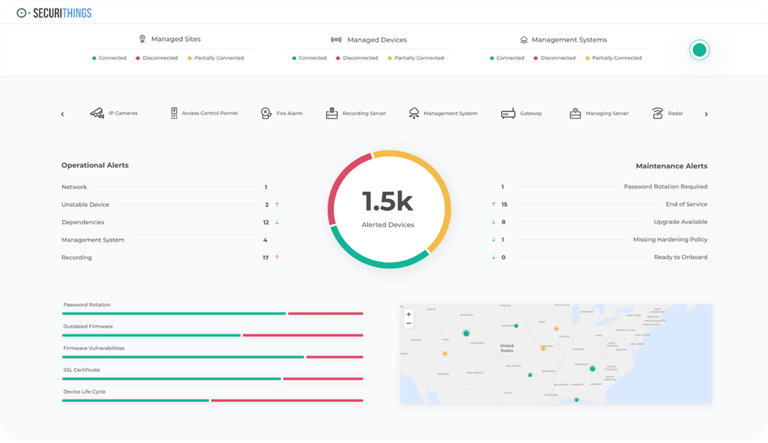
SecuriThings operational dashboard showing device alerts, maintenance tasks, compliance indicators, and geolocation of assets. (Source)
Automate device management
Implement automated patching and configuration control to keep devices compliant and resilient against known vulnerabilities.
Outdated firmware and inconsistent configurations create security gaps and operational instability. Automation helps apply updates at scale, maintain consistent settings, and reduce manual errors. 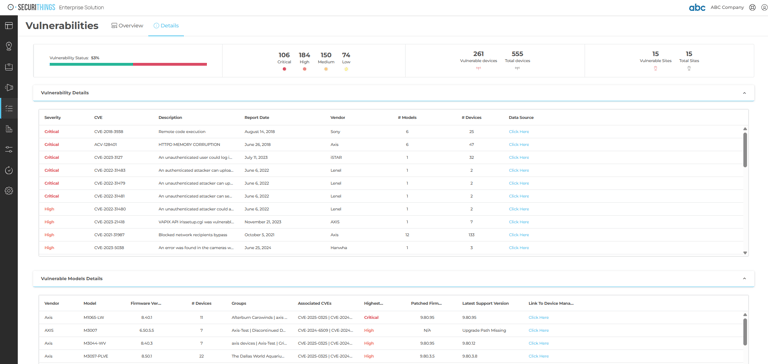
SecuriThings vulnerability management view showing firmware status, critical CVEs, device counts, and patch availability across multiple vendors. (Source)
Plan for the entire device lifecycle
Lifecycle planning helps forecast replacements, budget upgrades, and avoid unexpected failures. This includes procurement standards, commissioning tests, operational maintenance, and secure decommissioning.
Develop a lifecycle plan that sets replacement timelines and outlines how devices are installed, maintained, and securely retired.
Define vendor SLAs and hold integrators accountable
Set measurable SLAs and review vendor performance regularly to confirm they meet operational and quality expectations. Service-level agreements (SLAs) should clearly define response times, warranty coverage, maintenance schedules, replacement parts, and support obligations.Establish secure end-of-life procedures
Wipe or destroy storage components before disposal, and document decommissioning steps for audit and compliance.
Cameras, access panels, and recorders may store sensitive data or credentials. Secure disposal and data sanitization is essential to prevent unauthorized recovery of stored information.
Standardize device models and configurations
Using too many device types or firmware versions increases operational risk. Standard device models and configurations minimize complexity and maintain consistent performance. They simplify troubleshooting, training, inventory management, and replacement.
Build operational readiness through training and accountability
Responders require clear, practical guidance rather than guesswork when an alarm goes off or an unusual situation occurs. Playbooks outline who must act, what steps to take, and how to escalate issues. They also help standardize responses across sites and shifts.
Create short, role-based playbooks for scenarios like intrusion, system failure, fire, medical events, or suspicious activity, and keep them easily accessible.
Conduct regular training
Run scheduled exercises, both announced and unannounced, to evaluate readiness and refine response procedures. Provide annual refresher courses and short update sessions to keep staff confident and current.
Drills and tabletop exercises reveal gaps in procedures, communication issues, and dependencies that may not be obvious on paper. They also improve staff confidence and reinforce muscle memory during critical moments.
Provide cross-training to build redundancy and continuity
Train backup personnel for critical security roles so operations can continue even when primary staff are unavailable. Staff turnover, absences, and unexpected events can leave key roles unfilled if only one person knows a critical procedure. Cross-training prepares additional personnel to step into essential functions without disruption.
Design facilities that naturally support security
When facilities are planned with security in mind, protective measures feel natural instead of restrictive. Concepts like visibility, access zoning, and environmental design make it harder for unauthorized individuals to move freely while keeping spaces functional for everyday use. Design your facilities so the environment itself helps prevent incidents, guides behavior, and supports safety without relying solely on technology or personnel.
Apply CPTED principles
Crime Prevention Through Environmental Design (CPTED) focuses on shaping the environment to discourage unwanted behavior. Good lighting, clear sightlines, defined pathways, and visible boundaries help staff notice suspicious activity early.
Utilize CPTED techniques to make spaces more intuitive and less vulnerable to intruders.
Integrate life-safety systems with physical security measures
Coordinate early with safety engineers to align evacuation routes, fire codes, and lockdown requirements with your security controls.
Security design must work hand in hand with fire protection, emergency egress, HVAC controls, and safety infrastructure. Coordination between these systems prevents conflicts, such as an emergency door that must unlock during a fire or a lockdown system that restricts movement during threats.
Design for environmental resilience and continuity
Facilities face environmental risks, including flooding, severe weather, power disruptions, and extreme temperatures. Identify local environmental risks and incorporate structural protections, such as drainage, elevation, or weather-resistant materials, into the facility design.
Reinforcing exposed areas and ensuring power redundancy helps maintain operations.
Coordinate security requirements early in the architectural design process
Include security specifications in early construction planning meetings where possible so protective measures become part of the design, not an afterthought.
Security often becomes expensive and difficult to implement when introduced late in a project. Early involvement allows architects and engineers to integrate requirements into the building’s shape, layout, utilities, and circulation patterns.
Evolve your security program through regular validation and learning
Schedule annual assurance reviews and document findings so weaknesses can be addressed before they turn into incidents.
Security controls degrade over time, and procedures often lose consistency without oversight. Regular reviews, whether internal or third-party, help verify whether policies are being followed, systems are functioning correctly, and if any gaps have emerged.
SecuriThings streamlines audits by maintaining device histories, configuration changes, firmware records, and compliance evidence in one place. It makes it easier to validate performance over time.
Benchmark performance
Benchmarking provides an external reference point to understand whether your program is ahead, aligned, or falling behind. Comparing against industry standards, sector guidelines, and similar organizations helps identify areas that need modernization.
Use benchmarking data to adjust your roadmap and align your program with recognized best-practice expectations.
Review security measures after incidents
Conduct post-incident or post-change reviews. Significant events, such as intrusions, system failures, or operational changes, offer valuable insights. Reviewing them helps determine whether policies were followed, where processes broke down, and what could be improved.
Update procedures, staffing, or controls based on the lessons learned.
Plan for modernization
Build a refresh cycle that identifies end-of-life systems and prioritizes upgrades based on risk and operational impact.
Outdated devices, unsupported software, and legacy configurations introduce operational and security risks. Regular reviews help identify where upgrades, replacements, or redesigns are needed. Modernization also supports scalability as facilities expand or adopt new technologies.
Stay informed
Threat actors adapt their methods, and regulations evolve to reflect new risks. Staying aware of trends, both within your industry and across the wider security landscape, helps organizations adjust their posture proactively rather than reactively.
Designate responsibility for tracking emerging threats, reviewing regulatory updates, and communicating changes to the broader security team.
Last thoughts
Today’s environments, like distributed sites and large device fleets, make manual oversight difficult. Many organizations now rely on centralized platforms that automate device health monitoring, streamline access and policy management, and provide real-time visibility across all sites. These capabilities help teams detect issues earlier, reduce operational workload, and maintain consistent protection at scale.
By combining proven best practices with modern automation and unified oversight, organizations can build a security program that stays effective as risks evolve and operations grow.
SecuriThings enables this shift by unifying device monitoring, automation, alerting, and reporting into a single operational platform aligned directly with these best practices. 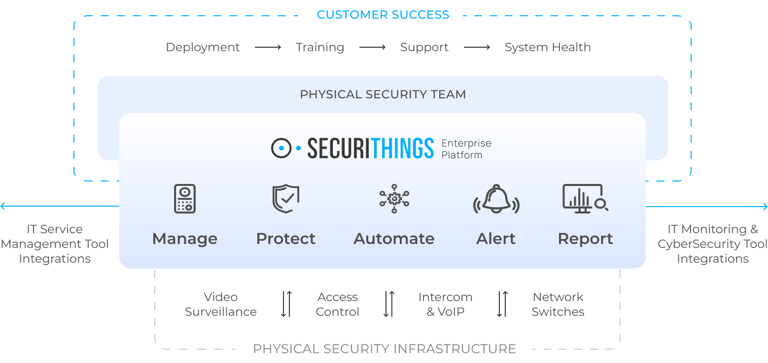
SecuriThings platform overview showing end-to-end lifecycle support across device management, automation, alerting, reporting, and IT integrations. (Source)